Firmware & code
Build it yourself
pip install platformio
pio run -e cyd2usb-mac      # USB-C / 2-USB board (ST7789, BGR), Mac host
pio run -e cyd2usb-win      # same board, Windows host (Alt/Ctrl labels, Ctrl+A)
pio run -e cyd              # original micro-USB board (ILI9341)
tools/merge.sh cyd2usb-mac  # full 0x0 image, -update.bin (0x10000) and the web-flasher pieces; version from include/version.h
Build flags (add to build_flags or -D on the command line):
| Flag | Default | Meaning |
|---|---|---|
PTT_MODS |
(MOD_CTRL\|MOD_OPT) |
modifier bits of your Wispr push-to-talk chord (MOD_CTRL, MOD_SHIFT, MOD_OPT, MOD_CMD) |
PTT_KEY |
KEY_T |
the key in the chord (KEY_T, KEY_SPACE, or any HID usage code) |
PTT_LABEL |
"Ctrl + Opt + T" |
what the About page shows for the chord — set it if you change the chord |
HOST_WIN |
unset | Windows host: Alt/Ctrl names on screen, Ctrl+A for Select all (the cyd2usb-win env sets it; cyd2usb-mac is the default) |
PANEL_ROTATION |
1 |
3 flips the landscape image 180° (USB on the other side) |
BLE_NAME |
"Flow Ctrl" |
name shown in Bluetooth settings |
DIM_AFTER_MS |
0 |
0 = always full brightness (the board is USB-powered). Set e.g. 45000 to dim after idle; it never turns off |
LED_QUIET |
unset | define to silence the RGB LED |
TOUCH_DEBUG |
unset | print raw touch coordinates on serial |
Stack: PlatformIO · espressif32 7.1.3 (Arduino) · LVGL 9.5 · TFT_eSPI · XPT2046_Touchscreen · NimBLE-Arduino 2.x. ~103 KB RAM, ~890 KB flash. Compiles clean with no PSRAM.
The screen
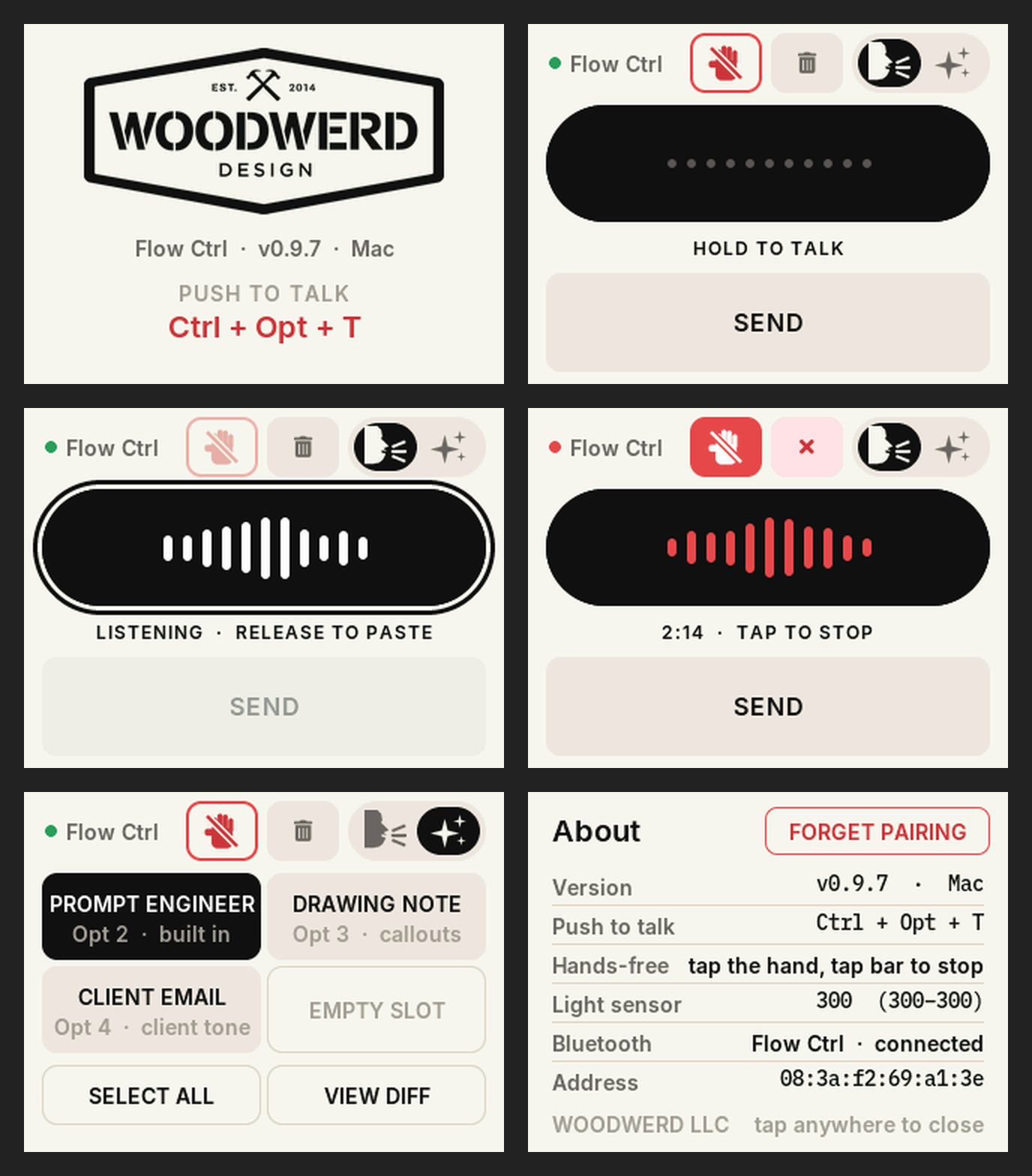
Landscape 320 × 240, a light "paper" theme taken from Wispr Flow: warm off-white, black type, one
red accent kept for live or destructive states (-DTHEME_DARK restores the old dark colours).
HOLD TO TALK is a 296 × 78 px black bar styled after Wispr's Flow bar, with eleven waveform bars
inside: dots at rest, white while held (plus a ring around the bar), red during hands-free. Under it a
12 px status line; under that SEND, full width at 66 px. The top row carries the hands-free hand, the
trash and the page selector. During hands-free the hand turns solid red and a tap anywhere on the bar
stops the session — the big target, so stopping never takes aim. The RGB LED follows the same state.
The backlight stays at full brightness — the board is USB-powered, so there is nothing to save and
never a "wake-up" tap.
Colours, radii and fonts are tokens in src/theme.h. tools/mock.py renders every state with PIL so
you can retune without flashing; tools/make_guide.py builds the annotated screens in docs/.
Code map
platformio.ini      envs: cyd (ILI9341) / cyd2usb-mac (ST7789, BGR) / cyd2usb-win (+HOST_WIN). Pins from the CYD repo's PINS.md
include/version.h   FW_VERSION — the one place the version lives (banner, splash, About page, merge.sh)
src/main.cpp        UI (LVGL), touch, state machine, backlight, LED
src/ble_kbd.*       minimal NimBLE HID keyboard: boot-keyboard report map, press / releaseAll / tap
src/theme.h         colour, radius and font tokens
src/assets/         Inter SemiBold 12/14/16/20 + IBM Plex Mono 14 as LVGL fonts (OFL, licences alongside); ic_*.c icons (head, sparkles, hand)
include/lv_conf.h   LVGL 9.5 configuration
tools/merge.sh      full 0x0 image + app-only update image + bootloader/partitions/boot_app0 pieces
tools/make_icons.py PIL-drawn icons → LVGL A8 arrays in src/assets (needs LVGL's LVGLImage.py)
tools/sim/run.sh    renders the real firmware on a desktop (LVGL + stubs, no board) and rebuilds the docs
                    images: guide-*.png and screen-states.png. Use this after any screen change.
tools/mock.py       older PIL mock of the v0.9.5 screens (superseded by tools/sim)
tools/make_guide.py older annotated screens for v0.9.5 (superseded by tools/sim)
release/            prebuilt merged image
Notes for anyone adapting it
- The display is driven with a plain TFT_eSPI flush callback and
setRotation(1), not LVGL'slv_tft_espihelper, so landscape needs no software rotation. - Touch calibration is self-adjusting: the raw min/max grow as you use it, so the corners get
accurate after a few presses.
TOUCH_DEBUGshows the raw numbers if a board is far off. - The HID layer sends modifiers in one report and the key in the next, 12 ms later, like a physical keyboard does — some apps ignore a chord that arrives in a single report.
- Bluetooth link tuning (v0.9.5). macOS opens a HID link with a 720 ms supervision timeout, then
moves a bonded keyboard to interval 15 ms, latency 22. On the ESP32 that latency is the problem:
the board is allowed to sleep through 22 connection events, occasionally misses a channel-map
instant, and the Mac drops the link with
0x228— which looked like the button "going back into pairing mode" every minute or two.ble_kbd.cpptherefore waits until the link is encrypted, then asks for latency 0, 6 s timeout (BleKbd::tick()fromloop()), and asks again if the Mac re-applies latency (three tries per connection, so it can never ping-pong). The board is USB-powered, so listening on every event costs nothing. The serial log at 115200 prints every parameter change and decodes disconnect reasons if you need to see it on your own Mac. - Version on the glass. A four-second logo splash at boot (painted to the panel before LVGL starts, then faded out) and an About page on long-press of the title
(
show_about()inmain.cpp, drawn on LVGL's top layer). It is a long press on a label, not a button, so it can't be triggered by a heavy hand on HOLD TO TALK. No swipes anywhere, on purpose. - Bond mismatch heals itself. If the link dies at the encryption step twice in a row (reasons
0x205/0x206/0x23D — the computer's key no longer matches ours, typically after a flash with
erase),
ble_kbd.cppdeletes its bonds and the status line asks the user to remove and re-add the device. The About page's Forget pairing does the same on demand. The Flash page no longer offers to erase, so an ordinary reflash keeps the bond. - The trash is contextual.
discard()sendsEscwhile a hands-free session is open (Wispr cancels it) andCmd+Z/Ctrl+Zotherwise (undoes the last paste). It never fires under a held chord, because releasing the chord early would paste before the Esc arrived. - Any other app with a keyboard shortcut (Superwhisper, MacWhisper, a meeting mute key, a macro)
can be driven the same way: change
PTT_MODS/PTT_KEY.