Media Ctrl: a Bluetooth desk media remote on the Cheap Yellow Display
An open-hardware project from WOODWERD LLC, a design group in Austin, Texas.
Media Ctrl turns the ESP32-2432S028R "Cheap Yellow Display" (CYD) into a small media remote that stands beside your keyboard, in portrait. It connects over Bluetooth to up to three devices at once, such as an iPhone, an iPad and a Mac, shows what's playing, and controls it. No app is needed.
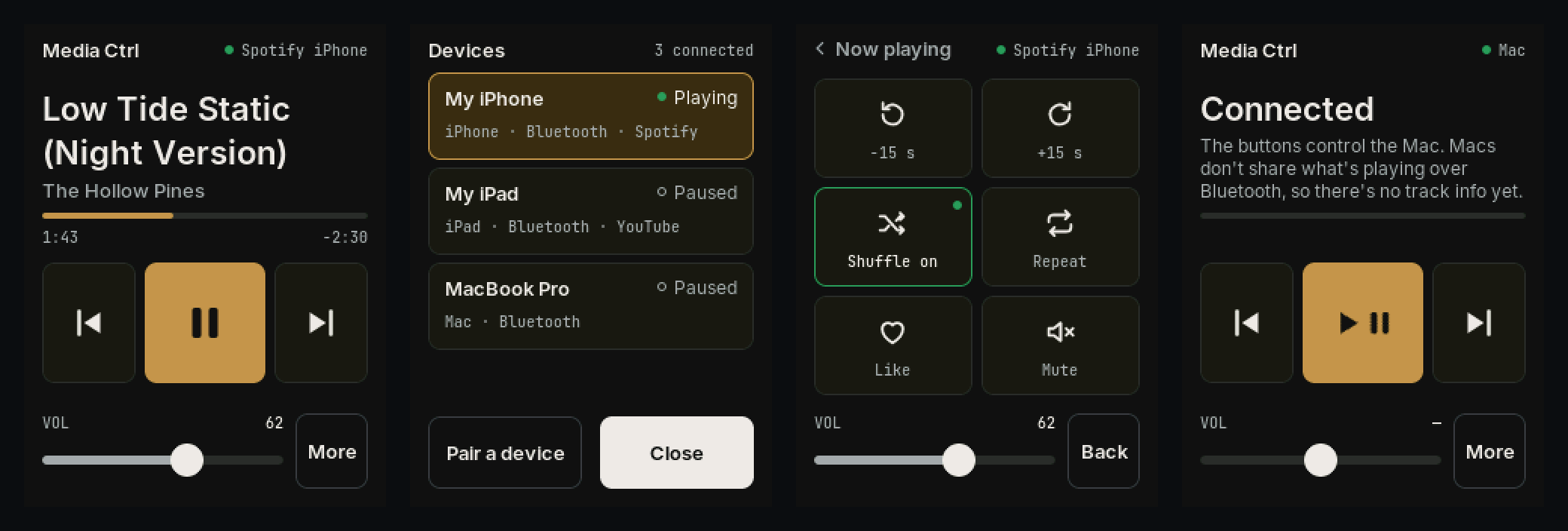
- Now playing: the app and device (Spotify iPhone, YouTube iPad), track title, artist, a live progress bar and the volume.
- Transport: large previous, play/pause and next buttons, and a volume slider.
- Devices: hold the top right of the screen to see every connected and saved device, switch between them, pair another, or forget one. The board also follows whichever device starts playing.
- More: skip back and forward, shuffle, repeat, like and mute.
- Works with any app that shows in Control Center on an iPhone or iPad, such as Spotify, Apple Music, Podcasts and YouTube. On a Mac it works as media keys for now; see Media Ctrl on a Mac.
New here? Start with Getting started, then Flash it.
Status: public beta, x0.3.0. It's in daily use with an iPhone, an iPad and a Mac. Windows and Android are untested, and computers get media keys only until the Bluetooth helper arrives. Problems and ideas are welcome as issues.
Unofficial. Not affiliated with or endorsed by Apple or Spotify. See THIRD_PARTY_NOTICES.md.
How it works
Each Bluetooth LE link does two jobs:
- Media keys. The board is a Bluetooth HID device that sends only the standard media keys (Consumer Control page): play/pause, next, previous, volume and mute. Every computer, phone and tablet understands these. The HID descriptor has no keyboard collection, so an iPhone or iPad keeps its on-screen keyboard. A Mac gets Fast Forward and Rewind for next and previous, because macOS skips tracks on those.
- Apple Media Service (AMS). iPadOS and iOS publish the system's Now Playing state to paired Bluetooth accessories through AMS, the same channel an Apple Watch uses. The board subscribes to it to read the app, title, artist, duration, elapsed time, volume, shuffle and repeat. It also sends AMS remote commands, including skip ±, like, shuffle and repeat, which have no media-key equivalent.
The board holds up to three links at once, each with its own track and controls. It shows one device at a time and stays on the last one that started playing until another starts, so pausing never moves it. You can also choose a device on the Devices screen. Buttons only ever reach the device on screen.
macOS and Windows don't publish Now Playing to accessories, so a computer gets the media keys only, and the screen says so. Helper apps that send a computer's track info over Bluetooth are planned. The USB cable carries no media: it powers the board and is used for flashing and diagnostics.
| On the screen | iPhone, iPad (AMS) | Without AMS (media keys) |
|---|---|---|
| Title, artist, progress, volume | ✓ | — |
| Previous / Play-Pause / Next | ✓ | ✓ |
| Volume slider | ✓ (the number follows the device) | ✓ in steps |
| −15 s / +15 s, shuffle, repeat, like | ✓ if the app supports it (tiles dim if not) | — |
| Mute | media key | media key |
iPhone, iPad, Mac and the rest
| Device | What you get |
|---|---|
| iPhone, iPad | Everything above. |
| Mac | Media keys: play/pause, previous, next and volume, sent to the app that played last. No track info yet. See Media Ctrl on a Mac. |
| Windows, Android | Media keys only (untested). |
Three devices stay connected together, and the board remembers six. Pair each from its Bluetooth settings. With three connected, open Devices and tap Pair a device to make room. To remove one device, hold its row on Devices and tap again to confirm. See Getting started.
Quick start (no toolchain)
- Flash
release/media-ctrl-x0.3.0-cyd2usb.binat address 0x0, either: - from the Flash it page in Chrome or Edge, or
- in a terminal, after
pip install esptool:esptool.py --chip esp32 --port /dev/cu.usbserial-XXXX --baud 460800 write_flash 0x0 media-ctrl-x0.3.0-cyd2usb.binIf the port doesn't appear, hold BOOT while plugging the board in. 921600 baud is unreliable on the CH340. - Pair. On the iPhone or iPad, open Settings › Bluetooth, tap Media Ctrl, then tap Pair. On a Mac, use System Settings › Bluetooth.
- Play something. Within a couple of seconds the screen fills in.
The full image starts with a clean pairing table each time it's flashed. To update without losing pairings, write release/media-ctrl-x0.3.0-cyd2usb-app-0x10000.bin at 0x10000 instead.
Hardware
- ESP32-2432S028R CYD, USB-C / "2-USB" variant (ST7789 panel). This is the prebuilt image.
- Original micro-USB CYD (ILI9341). Build the
cydenvironment (untested). - Power: USB from a charger, a hub or a computer. The cable carries power only, plus flashing and diagnostics. Battery power is planned. The backlight dims after two minutes untouched and never turns off; a touch or a new track wakes it.
Nothing to solder.
Case & parts
Media Ctrl fits the WOODWERD CYD Case, the printed housing shared by every WOODWERD CYD build. It has STL/STEP files, a full BOM, a fastener spec and a step-by-step build guide. Use housing v2 for now, standing in portrait; a dedicated portrait stand is planned.
| Qty | Part | Spec |
|---|---|---|
| 1 | Cheap Yellow Display, USB-C / 2-USB variant | ESP32-2432S028R with a USB-C port |
| 1 | USB-C cable, data | USB-C → USB-A recommended (some boards lack CC resistors) |
| 4 | Flat-head screw | M3 × 14 mm, 90° countersunk (DIN 7991) |
| 4 | Heat-set insert | M3 brass, 4 mm long, OD 4.0–4.2 mm |
| 3 | Printed parts | Base, lid, light pipe: see cyd-case |
The firmware runs fine on a bare board too.
Docs
- Getting started: pairing, every screen and button, switching and forgetting devices, About and troubleshooting.
- Flash it: browser flasher and terminal commands.
- Media Ctrl on a Mac and on Windows: pairing, what works, and the planned helper.
- Firmware & code: building, build flags, how the Bluetooth layer works, the host simulator.
- Bench test: the checklist used before each release.
- Case & parts: the WOODWERD CYD Case, BOM and build guide.
- Changelog.
License
MIT © 2026 WOODWERD LLC. See LICENSE and THIRD_PARTY_NOTICES.md for the libraries and fonts it builds on.